Modifying License Count
The SiX License Console allows administrator users to modify their license count on the fly, provided the Business Unit is not in the "5 Free License" mode.
Billing Impact
Modifying the license count will affect your billing. Customers are billed for the maximum number of licenses configured during the calendar month.
Steps to Modify License Count
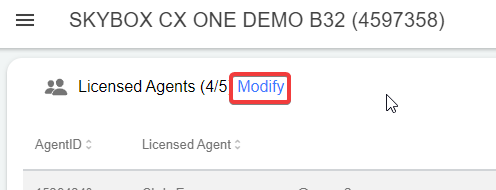
1. Click the Modify Button
Click the Modify Total Licenses button on the main dashboard of the License Console.
2. Enter Changes
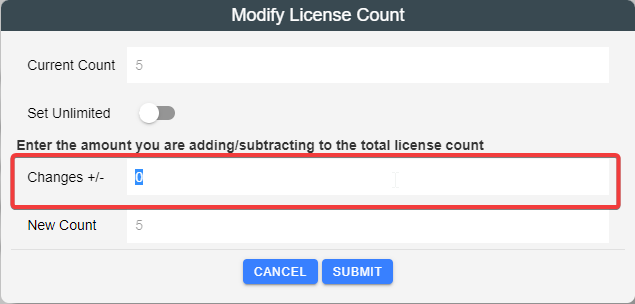
In the Changes field, enter a positive or negative number to adjust your total count.
- The New License Count field will automatically update to show what the final total will be.
- Example: If you have 20 licenses and want 25, enter
5. If you want to reduce to 15, enter-5.
3. Submit and Accept Terms
Click the Submit button and accept the terms and conditions to finalize the change.