Placing a Call on Mute
You can mute your microphone during a call so the contact cannot hear you.
Steps
1. Click MUTE
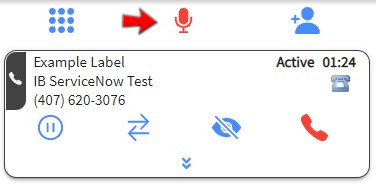
The Mute button indicator activates and turns red, showing the call is muted. The contact can no longer hear you. The active contact header also turns dark gray.
2. Click UNMUTE
The mute indicator deactivates and the contact can hear you again.
Note
Muting a call does not put the contact on hold. The contact remains connected and any hold music or messaging does not play.