Playing a Voicemail
When a voicemail is delivered to your interface, it will play automatically. You can control the playback using the on-screen controls.
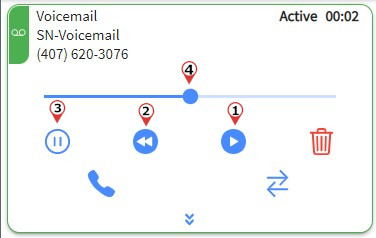
Playback Controls
1. Click PLAY
Replays the voicemail from the beginning or resumes playback.
2. Click BACK 10
Moves the voicemail playback 10 seconds backward.
3. Click HOLD
Puts the voicemail on hold. Clicking RESUME will restart the voicemail playback from the beginning.
4. Seek Bar
Click and drag the seek bar to jump to a specific section of the voicemail recording.